
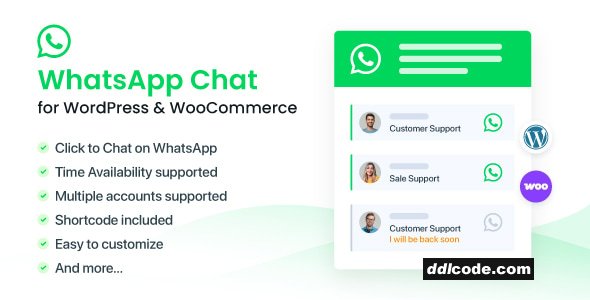
WhatsApp Chat for WordPress plugin allows you to integrate your WhatsApp experience directly into your website. This is one of the best way to connect and interact with your customers, you can offer support directly as well as build trust and increase customer loyalty.
NinjaTeam WhatsApp Chat plugin allows you to add multiple accounts of your members into a WhatsApp box to display. You customer can choose a supporter they want to chat, they know exactly who they are having a conversation.
EASILY CUSTOMIZE
NinjaTeam WhatsApp Chat plugin provides you options to select colors for the WhatsApp box to fit your website style and taste. Moreover, you can customize each box for each person depending on their time availability with photo, name tag and job title. When you are online, the button is green or other color you set, otherwise, it is grey. Therefore, when you’re not responding quickly, customers don’t feel they are ignored. They know exactly your available time in which you set it at the first place.
SUPPORT WPML
Is you site multi-language? Don’t worry! You can use any WordPress translation plugins like WPML, Polylang to customize any languages on your site easily and quickly.
SHORTCODE INCLUDED
With shortcode from NinjaTeam WhatsApp Chat plugin, you can display the WhatsApp box anywhere on your site. It can be a page, a post, some particular pages, posts or the whole of your website.
NO CODING REQUIRED
We took the hardest part of coding. We spent time on designing and making UI/UX as best as we can. All you need to do is just uploading the plugin into WordPress, activating the plugin, customizing all the available options and Done!
Enjoy conversations with your customers anytime anywhere! It has never been easier, and stop losing your potential leads!
FEATURES
SUPPORT MULTIPLE ACCOUNTSNinjaTeam WhatsApp Chat plugin allows you to add multiple accounts of your members into a WhatsApp box to display. You customer can choose a supporter they want to chat, they know exactly who they are having a conversation.
EASILY CUSTOMIZE
NinjaTeam WhatsApp Chat plugin provides you options to select colors for the WhatsApp box to fit your website style and taste. Moreover, you can customize each box for each person depending on their time availability with photo, name tag and job title. When you are online, the button is green or other color you set, otherwise, it is grey. Therefore, when you’re not responding quickly, customers don’t feel they are ignored. They know exactly your available time in which you set it at the first place.
SUPPORT WPML
Is you site multi-language? Don’t worry! You can use any WordPress translation plugins like WPML, Polylang to customize any languages on your site easily and quickly.
SHORTCODE INCLUDED
With shortcode from NinjaTeam WhatsApp Chat plugin, you can display the WhatsApp box anywhere on your site. It can be a page, a post, some particular pages, posts or the whole of your website.
NO CODING REQUIRED
We took the hardest part of coding. We spent time on designing and making UI/UX as best as we can. All you need to do is just uploading the plugin into WordPress, activating the plugin, customizing all the available options and Done!
Enjoy conversations with your customers anytime anywhere! It has never been easier, and stop losing your potential leads!
FAQ
Guests are not allowed to download. First thing to do is register for a free account.
Once you are a free member you are limited to 3 downloads a day, excluding Premium Files available only to Premium Users. The download link is available on the right side block just above the Demo button.
Once you are a free member you are limited to 3 downloads a day, excluding Premium Files available only to Premium Users. The download link is available on the right side block just above the Demo button.
Unfortunately No. If you require technical support regarding a downloaded file then you will need to either purchase the product directly from the author (a link is provided) or you will need to hire a freelancer to take a look for you. Alternatively, you could ask around some of the helpful community forums around the web.
We have a dedicated broken link report link just bellow the Demo button. You could also leave a comment with your question and we'll do our best to answer it.
We provide CLEAN and SAFE resources. You can use them for development and testing purposes. Our files are double checked by our experts. Any antivirus alert about a possible infection is most likely a False Positive.
No, we do not allow leeching or reselling or stacking up our products. We will instantly ban any account found to be violating our terms and conditions / fair usage policy.
Give this download a rating!
( 0 ) votes so far.
Comments 0
WhatsApp Chat for WordPress plugin allows you to integrate your WhatsApp experience directly into your website. This is one of the best way to connect and interact with your customers, you can offer support directly as well as build trust and increase customer loyalty.
NinjaTeam WhatsApp Chat plugin allows you to add multiple accounts of your members into a WhatsApp box to display. You customer can choose a supporter they want to chat, they know exactly who they are having a conversation.
EASILY CUSTOMIZE
NinjaTeam WhatsApp Chat plugin provides you options to select colors for the WhatsApp box to fit your website style and taste. Moreover, you can customize each box for each person depending on their time availability with photo, name tag and job title. When you are online, the button is green or other color you set, otherwise, it is grey. Therefore, when you’re not responding quickly, customers don’t feel they are ignored. They know exactly your available time in which you set it at the first place.
SUPPORT WPML
Is you site multi-language? Don’t worry! You can use any WordPress translation plugins like WPML, Polylang to customize any languages on your site easily and quickly.
SHORTCODE INCLUDED
With shortcode from NinjaTeam WhatsApp Chat plugin, you can display the WhatsApp box anywhere on your site. It can be a page, a post, some particular pages, posts or the whole of your website.
NO CODING REQUIRED
We took the hardest part of coding. We spent time on designing and making UI/UX as best as we can. All you need to do is just uploading the plugin into WordPress, activating the plugin, customizing all the available options and Done!
Enjoy conversations with your customers anytime anywhere! It has never been easier, and stop losing your potential leads!
FEATURES
SUPPORT MULTIPLE ACCOUNTSNinjaTeam WhatsApp Chat plugin allows you to add multiple accounts of your members into a WhatsApp box to display. You customer can choose a supporter they want to chat, they know exactly who they are having a conversation.
EASILY CUSTOMIZE
NinjaTeam WhatsApp Chat plugin provides you options to select colors for the WhatsApp box to fit your website style and taste. Moreover, you can customize each box for each person depending on their time availability with photo, name tag and job title. When you are online, the button is green or other color you set, otherwise, it is grey. Therefore, when you’re not responding quickly, customers don’t feel they are ignored. They know exactly your available time in which you set it at the first place.
SUPPORT WPML
Is you site multi-language? Don’t worry! You can use any WordPress translation plugins like WPML, Polylang to customize any languages on your site easily and quickly.
SHORTCODE INCLUDED
With shortcode from NinjaTeam WhatsApp Chat plugin, you can display the WhatsApp box anywhere on your site. It can be a page, a post, some particular pages, posts or the whole of your website.
NO CODING REQUIRED
We took the hardest part of coding. We spent time on designing and making UI/UX as best as we can. All you need to do is just uploading the plugin into WordPress, activating the plugin, customizing all the available options and Done!
Enjoy conversations with your customers anytime anywhere! It has never been easier, and stop losing your potential leads!
Date Updated
May 22, 2026File Type
UntouchedFile Access
FreeDate & Edit Reason
22-05-26 15:06 updated to 3.8.2Download
Guests are not allowed to download files from our servers.
Please register for a free account and enjoy the benefits.
Demo
Please register for a free account and enjoy the benefits.
Problem with download?
Register...
Date Published (edited): 22-05-26 15:06
Total Views: 230


