
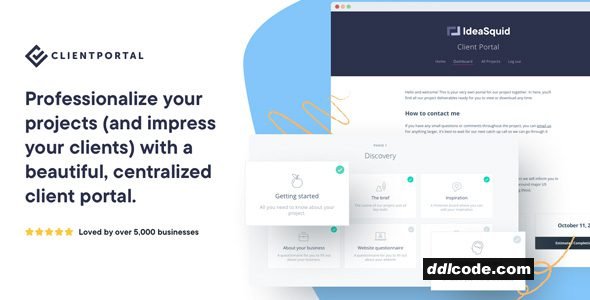
Client Portal is a project management and client communication tool designed specifically for freelancers, agencies, and service-based businesses. Rather than relying on bloated project management software, Client Portal offers a clean, branded area on your WordPress site where clients can log in to track their project progress, access documents, and stay informed—all in one place.
Built to integrate directly with WordPress, Client Portal lets you create secure, professional-looking portals for each client or project. You can add modules for timelines, deliverables, invoices, contracts, onboarding documents, and anything else you need to share. Everything is private, organised, and easy to navigate—giving clients a polished experience while reducing email back-and-forth.
What sets Client Portal apart is its simplicity and focus on client experience. There’s no steep learning curve, and you don’t need to be a developer to set it up. Each portal can be customised with your branding and tailored to fit each client’s needs. You can also clone existing portals, add status updates, and control visibility of specific modules.
Whether you’re a solo freelancer or running a team, Client Portal helps you look more professional and stay organised without adding complexity to your workflow.
What it does
Creates secure, branded client portals on your WordPress site where you can share documents, updates, and project information.
Who it’s for
Ideal for freelancers, agencies, consultants, and service providers who want to offer a clean, professional client experience.
Key benefit
Improves client communication and project transparency while keeping everything neatly organised in one secure place.
Key Features
Built to integrate directly with WordPress, Client Portal lets you create secure, professional-looking portals for each client or project. You can add modules for timelines, deliverables, invoices, contracts, onboarding documents, and anything else you need to share. Everything is private, organised, and easy to navigate—giving clients a polished experience while reducing email back-and-forth.
What sets Client Portal apart is its simplicity and focus on client experience. There’s no steep learning curve, and you don’t need to be a developer to set it up. Each portal can be customised with your branding and tailored to fit each client’s needs. You can also clone existing portals, add status updates, and control visibility of specific modules.
Whether you’re a solo freelancer or running a team, Client Portal helps you look more professional and stay organised without adding complexity to your workflow.
What it does
Creates secure, branded client portals on your WordPress site where you can share documents, updates, and project information.
Who it’s for
Ideal for freelancers, agencies, consultants, and service providers who want to offer a clean, professional client experience.
Key benefit
Improves client communication and project transparency while keeping everything neatly organised in one secure place.
Key Features
- Branded, password-protected portals for each client or project
- Add and organise modules for deliverables, invoices, timelines, and more
- Fully customisable to match your business branding
- Easy module management with a drag-and-drop interface
- Clone existing portals for fast project setup
- Assign access permissions for different portal sections
- Built into your WordPress site—no third-party platform needed
- Clean, distraction-free interface for a polished client experience
FAQ
Guests are not allowed to download. First thing to do is register for a free account.
Once you are a free member you are limited to 3 downloads a day, excluding Premium Files available only to Premium Users. The download link is available on the right side block just above the Demo button.
Once you are a free member you are limited to 3 downloads a day, excluding Premium Files available only to Premium Users. The download link is available on the right side block just above the Demo button.
Unfortunately No. If you require technical support regarding a downloaded file then you will need to either purchase the product directly from the author (a link is provided) or you will need to hire a freelancer to take a look for you. Alternatively, you could ask around some of the helpful community forums around the web.
We have a dedicated broken link report link just bellow the Demo button. You could also leave a comment with your question and we'll do our best to answer it.
We provide CLEAN and SAFE resources. You can use them for development and testing purposes. Our files are double checked by our experts. Any antivirus alert about a possible infection is most likely a False Positive.
No, we do not allow leeching or reselling or stacking up our products. We will instantly ban any account found to be violating our terms and conditions / fair usage policy.
Give this download a rating!
( 0 ) votes so far.
Comments 0
Client Portal is a project management and client communication tool designed specifically for freelancers, agencies, and service-based businesses. Rather than relying on bloated project management software, Client Portal offers a clean, branded area on your WordPress site where clients can log in to track their project progress, access documents, and stay informed—all in one place.
Built to integrate directly with WordPress, Client Portal lets you create secure, professional-looking portals for each client or project. You can add modules for timelines, deliverables, invoices, contracts, onboarding documents, and anything else you need to share. Everything is private, organised, and easy to navigate—giving clients a polished experience while reducing email back-and-forth.
What sets Client Portal apart is its simplicity and focus on client experience. There’s no steep learning curve, and you don’t need to be a developer to set it up. Each portal can be customised with your branding and tailored to fit each client’s needs. You can also clone existing portals, add status updates, and control visibility of specific modules.
Whether you’re a solo freelancer or running a team, Client Portal helps you look more professional and stay organised without adding complexity to your workflow.
What it does
Creates secure, branded client portals on your WordPress site where you can share documents, updates, and project information.
Who it’s for
Ideal for freelancers, agencies, consultants, and service providers who want to offer a clean, professional client experience.
Key benefit
Improves client communication and project transparency while keeping everything neatly organised in one secure place.
Key Features
Built to integrate directly with WordPress, Client Portal lets you create secure, professional-looking portals for each client or project. You can add modules for timelines, deliverables, invoices, contracts, onboarding documents, and anything else you need to share. Everything is private, organised, and easy to navigate—giving clients a polished experience while reducing email back-and-forth.
What sets Client Portal apart is its simplicity and focus on client experience. There’s no steep learning curve, and you don’t need to be a developer to set it up. Each portal can be customised with your branding and tailored to fit each client’s needs. You can also clone existing portals, add status updates, and control visibility of specific modules.
Whether you’re a solo freelancer or running a team, Client Portal helps you look more professional and stay organised without adding complexity to your workflow.
What it does
Creates secure, branded client portals on your WordPress site where you can share documents, updates, and project information.
Who it’s for
Ideal for freelancers, agencies, consultants, and service providers who want to offer a clean, professional client experience.
Key benefit
Improves client communication and project transparency while keeping everything neatly organised in one secure place.
Key Features
- Branded, password-protected portals for each client or project
- Add and organise modules for deliverables, invoices, timelines, and more
- Fully customisable to match your business branding
- Easy module management with a drag-and-drop interface
- Clone existing portals for fast project setup
- Assign access permissions for different portal sections
- Built into your WordPress site—no third-party platform needed
- Clean, distraction-free interface for a polished client experience
Date Updated
Oct 5, 2026File Type
NulledFile Access
FreeDate & Edit Reason
05-10-26 10:02 updated to 5.10.0Download
Guests are not allowed to download files from our servers.
Please register for a free account and enjoy the benefits.
Demo
Please register for a free account and enjoy the benefits.
Problem with download?
Register...
Date Published (edited): 05-10-26 10:02
Total Views: 465


