
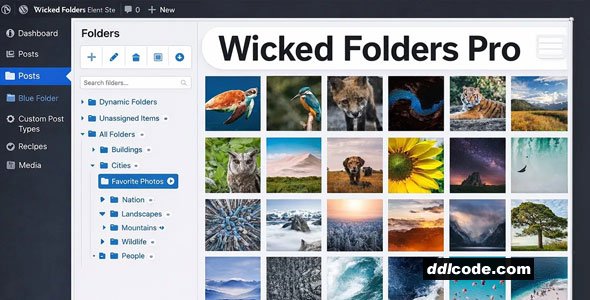
Wicked Folders is a WordPress plugin for site owners and developers who want to organise posts, pages, and media more efficiently. It works with WordPress and integrates with tools like WooCommerce, offering folder structures, drag-and-drop organisation, and content filtering to help keep large sites structured and easy to manage.
Wicked Folders Pro Plugin WordPress Features
- Media Library Folders
Drag and drop to quickly organize your WordPress media library using folders. - Bulk Move Items
Move multiple items at once to organize your media library even faster. - Add and Organize Folders
Quickly add new folders one-after-another and drag and drop to organize your folders the way you want. - Assign New Media to Folders
Save time by assigning new uploads directly to the folder you want. - Folders for Pages, Posts, and More
Use folders to organize your pages, posts, custom post types, WooCommerce products, Gravity Forms entries, users, plugins, and more. - Folder Permissions
Define permission policies that control what roles can view, edit, delete, and assign folders. - The Settings You Need
Comprehensive settings let you select which features to enable and choose which post types to enable folders for. - One-Click Plugin Updates
Enter your license key and update Wicked Folders with a single click from your WordPress dashboard. - Dynamic Folders
Browse content by author, date, page hierarchy, file extension, and category. - Custom Folder Sort Order
Order your folders using a custom sort order or sort them alphabetically. - Folder Search
Quickly filter your folder list by keyword. - Unassigned Items Folder
Instantly see which items haven’t been assigned to a folder yet. - Resizable and Collapsible Folder Pane
Resize the folder pane to any width you want or collapse it to hide it. - Folder Breadcrumbs
Breadcrumbs at the top of post lists let you quickly see what folder you’re in. - Works with Your Favorite Page Builder
Wicked Folders works with all popular page builders including , , , Visual Composer, and others. - Clone Folders
Easily copy a folder and its contents. - Seamless Integration
Add, edit, delete, and move files to folders directly in the WordPress media modal.
FAQ
Guests are not allowed to download. First thing to do is register for a free account.
Once you are a free member you are limited to 3 downloads a day, excluding Premium Files available only to Premium Users. The download link is available on the right side block just above the Demo button.
Once you are a free member you are limited to 3 downloads a day, excluding Premium Files available only to Premium Users. The download link is available on the right side block just above the Demo button.
Unfortunately No. If you require technical support regarding a downloaded file then you will need to either purchase the product directly from the author (a link is provided) or you will need to hire a freelancer to take a look for you. Alternatively, you could ask around some of the helpful community forums around the web.
We have a dedicated broken link report link just bellow the Demo button. You could also leave a comment with your question and we'll do our best to answer it.
We provide CLEAN and SAFE resources. You can use them for development and testing purposes. Our files are double checked by our experts. Any antivirus alert about a possible infection is most likely a False Positive.
No, we do not allow leeching or reselling or stacking up our products. We will instantly ban any account found to be violating our terms and conditions / fair usage policy.
Give this download a rating!
( 0 ) votes so far.
Comments 0
Wicked Folders is a WordPress plugin for site owners and developers who want to organise posts, pages, and media more efficiently. It works with WordPress and integrates with tools like WooCommerce, offering folder structures, drag-and-drop organisation, and content filtering to help keep large sites structured and easy to manage.
Wicked Folders Pro Plugin WordPress Features
- Media Library Folders
Drag and drop to quickly organize your WordPress media library using folders. - Bulk Move Items
Move multiple items at once to organize your media library even faster. - Add and Organize Folders
Quickly add new folders one-after-another and drag and drop to organize your folders the way you want. - Assign New Media to Folders
Save time by assigning new uploads directly to the folder you want. - Folders for Pages, Posts, and More
Use folders to organize your pages, posts, custom post types, WooCommerce products, Gravity Forms entries, users, plugins, and more. - Folder Permissions
Define permission policies that control what roles can view, edit, delete, and assign folders. - The Settings You Need
Comprehensive settings let you select which features to enable and choose which post types to enable folders for. - One-Click Plugin Updates
Enter your license key and update Wicked Folders with a single click from your WordPress dashboard. - Dynamic Folders
Browse content by author, date, page hierarchy, file extension, and category. - Custom Folder Sort Order
Order your folders using a custom sort order or sort them alphabetically. - Folder Search
Quickly filter your folder list by keyword. - Unassigned Items Folder
Instantly see which items haven’t been assigned to a folder yet. - Resizable and Collapsible Folder Pane
Resize the folder pane to any width you want or collapse it to hide it. - Folder Breadcrumbs
Breadcrumbs at the top of post lists let you quickly see what folder you’re in. - Works with Your Favorite Page Builder
Wicked Folders works with all popular page builders including , , , Visual Composer, and others. - Clone Folders
Easily copy a folder and its contents. - Seamless Integration
Add, edit, delete, and move files to folders directly in the WordPress media modal.
Additional File Information:
License Requirements Removed - Nulled File available to Premium members only.
License Requirements Removed - Nulled File available to Premium members only.
Date Updated
Oct 4, 2026File Type
NulledFile Access
PremiumDate & Edit Reason
04-10-26 06:42 updated to 4.2.0Download
Guests are not allowed to download files from our servers.
Please register for a free account and enjoy the benefits.
Demo
Please register for a free account and enjoy the benefits.
Problem with download?
Register...
Date Published (edited): 04-10-26 06:36
Total Views: 247


