
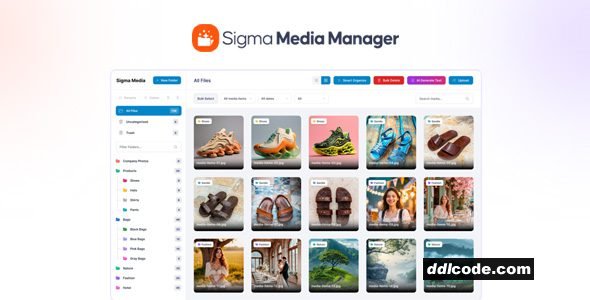
Sigma Media Manager organize your entire WordPress media library with folders, filters, drag & drop, advanced controls, and blazing-fast performance.
igma Media Manager Plugin WordPress Features
- Create, rename, and organize folders easily
- Folder colors for quick identification
- Auto-expand folders with subfolders
- Keyboard shortcuts for faster navigation
- Drag & drop files and folders
- Generate image titles, captions, and descriptions
- Process only images with empty fields
- Choose specific folders, selected images, or entire library
- Professional and consistent content style
- Smart time estimation before processing
- Automatically scan your entire media library for unused files
- Detect images and files not used in any posts or pages
- Preview unused media before deleting
- Select all or choose specific files to remove
- Reduce storage usage and improve site performance
- Automatically organize media files by type and usage
- Group uncategorized files into meaningful folders
- Improve media discoverability and workflow speed
- Perfect for content-heavy and WooCommerce sites
- Reduce clutter in large media libraries
- Grid and list view modes
- Adjustable items per page
- Custom thumbnail sizes
- Resizable sidebar for better visibility
- Show or hide file information
- REST API access toggle
- Optional delete-data-on-uninstall
- Smooth UX with lightweight scripts
- Drag & drop files and folders
- Optimized loading for large media libraries
- Import settings from previous backups
- Safe & simple configuration transfers
- Export plugin settings as JSON
- One-click full settings restore
FAQ
Guests are not allowed to download. First thing to do is register for a free account.
Once you are a free member you are limited to 3 downloads a day, excluding Premium Files available only to Premium Users. The download link is available on the right side block just above the Demo button.
Once you are a free member you are limited to 3 downloads a day, excluding Premium Files available only to Premium Users. The download link is available on the right side block just above the Demo button.
Unfortunately No. If you require technical support regarding a downloaded file then you will need to either purchase the product directly from the author (a link is provided) or you will need to hire a freelancer to take a look for you. Alternatively, you could ask around some of the helpful community forums around the web.
We have a dedicated broken link report link just bellow the Demo button. You could also leave a comment with your question and we'll do our best to answer it.
We provide CLEAN and SAFE resources. You can use them for development and testing purposes. Our files are double checked by our experts. Any antivirus alert about a possible infection is most likely a False Positive.
No, we do not allow leeching or reselling or stacking up our products. We will instantly ban any account found to be violating our terms and conditions / fair usage policy.
Give this download a rating!
( 0 ) votes so far.
Comments 0
Sigma Media Manager organize your entire WordPress media library with folders, filters, drag & drop, advanced controls, and blazing-fast performance.
igma Media Manager Plugin WordPress Features
- Create, rename, and organize folders easily
- Folder colors for quick identification
- Auto-expand folders with subfolders
- Keyboard shortcuts for faster navigation
- Drag & drop files and folders
- Generate image titles, captions, and descriptions
- Process only images with empty fields
- Choose specific folders, selected images, or entire library
- Professional and consistent content style
- Smart time estimation before processing
- Automatically scan your entire media library for unused files
- Detect images and files not used in any posts or pages
- Preview unused media before deleting
- Select all or choose specific files to remove
- Reduce storage usage and improve site performance
- Automatically organize media files by type and usage
- Group uncategorized files into meaningful folders
- Improve media discoverability and workflow speed
- Perfect for content-heavy and WooCommerce sites
- Reduce clutter in large media libraries
- Grid and list view modes
- Adjustable items per page
- Custom thumbnail sizes
- Resizable sidebar for better visibility
- Show or hide file information
- REST API access toggle
- Optional delete-data-on-uninstall
- Smooth UX with lightweight scripts
- Drag & drop files and folders
- Optimized loading for large media libraries
- Import settings from previous backups
- Safe & simple configuration transfers
- Export plugin settings as JSON
- One-click full settings restore
Date Updated
Sep 19, 2026File Type
NulledFile Access
FreeDate & Edit Reason
19-09-26 06:18 updated to 1.7.4Download
Guests are not allowed to download files from our servers.
Please register for a free account and enjoy the benefits.
Demo
Please register for a free account and enjoy the benefits.
Problem with download?
Register...
Date Published (edited): 19-09-26 06:18
Total Views: 487


